
Choose a shade
Pick a color from the palette. The examples above can help you compare familiar shades with something new.
 American Spiky HairAI Hairstyle Try-On
Choose a hair color, then upload your photo.
Color swatches are for reference only. Your original photo will not be modified.

AI color example, not a real user case. Your result may vary with your original hair color and lighting.
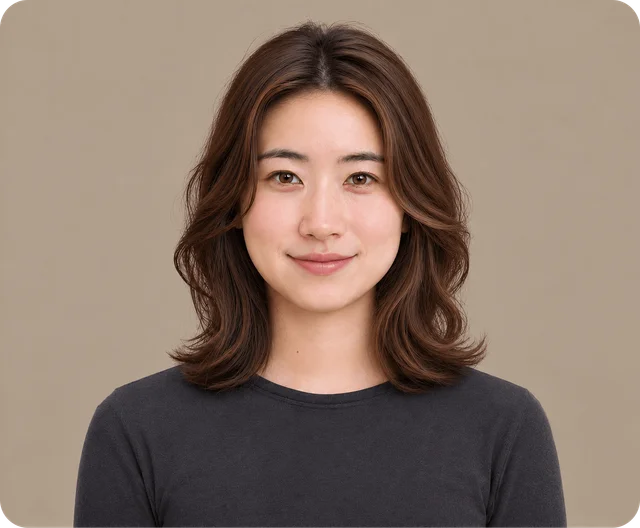
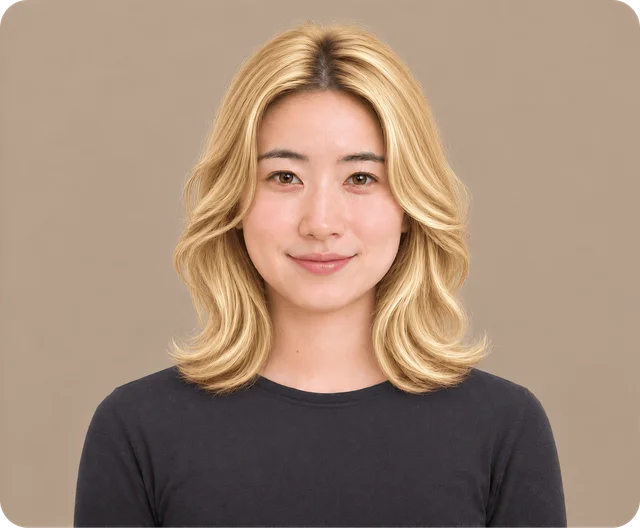 Original photoAI color preview · Blonde

Use a front-facing photo in soft, even daylight, without a strong filter. Keep the top, sides and ends of your hair in view. Compare darker and lighter shades first, then look at how warm and cool tones sit beside your face.
Lighting, screen settings and your starting hair color can all affect what you see. AI may also change some hair details. Treat the examples as a direction for choosing a color, not a promise of a salon result. A colorist can help assess what is achievable and whether lightening is needed for your hair.
Pick a color from the palette. The examples above can help you compare familiar shades with something new.
Select “Generate effect” to open the photo panel and prepare your own photo. Keep your hair fully visible, without a hat or anything covering it.
Drag the comparison above to view the example portrait before and after its AI color change. Look at brightness and warm or cool tones to find the direction you want to try.
You can currently browse AI examples, choose a shade and add a photo. Generating a color preview from your own photo is not available yet.